


ConnectNetwork by GTL
3.34.86K Reviews
App Specs
- Version
- 4.4.2
- Updated On
- License
- Free
- Downloads
- 1,000,000+
- Developer
- GTL ES
- Categories
- Finance
- Platform
- Android
Screenshots
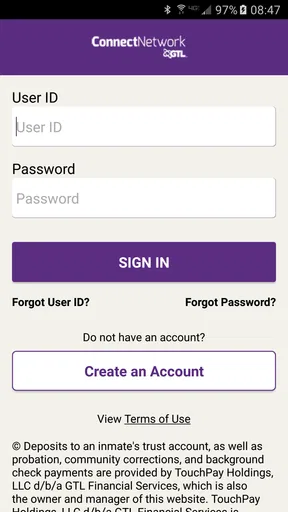
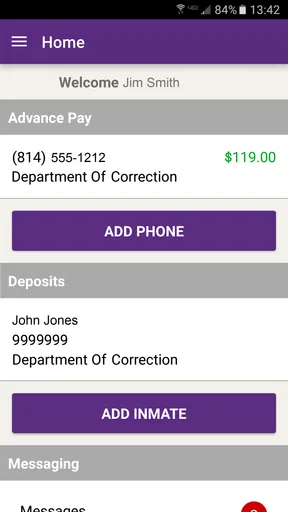
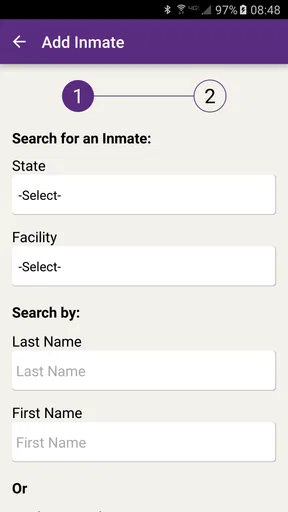
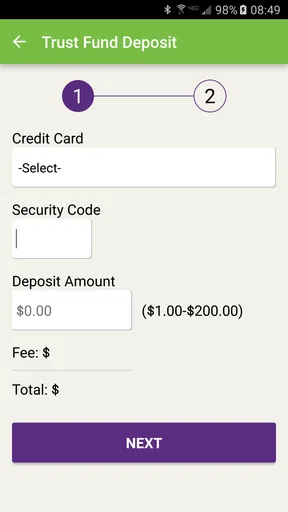
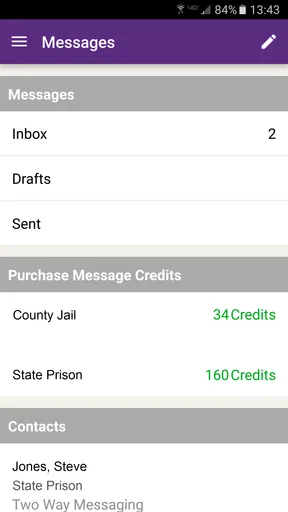
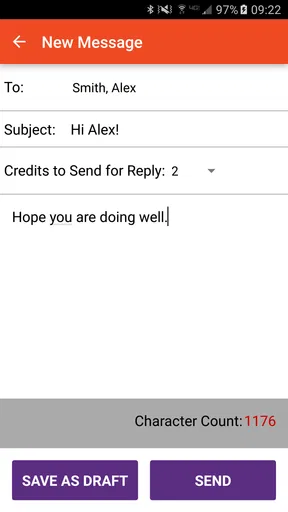
 Analysis by AppCompare
Staying in touch with someone who is incarcerated has a very different rhythm from ordinary messaging. There may be approved channels, account steps, facility-specific rules, and moments when a message matters more than its length. I reviewed ConnectNetwork as a finance-focused communication app from GTL ES, and my main impression is that it works best when I treat it as a practical connection point rather than as a general-purpose chat service.
The app is free to install and is rated for Everyone, which makes the first step approachable. Its purpose is narrow but important: helping people manage contact with incarcerated loved ones. That focus is also its biggest strength. I would not choose it for casual social messaging, but I can see why someone would keep it on a phone when communication with a particular facility is part of everyday family life.
What makes the experience less straightforward is that the app sits between personal communication and facility-managed services. A successful action depends on more than tapping a button. The right person, facility, account details, available service, and an active connection all need to line up. That is why my review focuses heavily on how the app behaves in real mobile situations, especially when the network is weak or when something does not go through as expected.
How ConnectNetwork feels when every action depends on a live connection
When I use a service for an important family connection, a live connection is part of the workflow, not a background detail. In this section, I look at how I would pace an action, verify what happened, and avoid turning a slow response into a duplicate attempt. That network-aware approach also helps clarify which problems belong to the phone and which call for a different kind of follow-up.
The network-dependent moments are easy to underestimate
ConnectNetwork is most useful when I am connected to a reliable mobile network or Wi-Fi. That sounds obvious, but it changes how I plan to use it. I would not open the app while rushing through a place with unstable reception and assume that an important action has completed simply because the screen responded. For this kind of service, a delayed page or interrupted submission can create uncertainty at exactly the wrong time.
My practical habit would be to wait until the phone shows a stable connection, open the app, review the recipient and facility details carefully, and then remain in the app long enough to see a clear result. If the connection drops during that process, I would avoid immediately repeating the same action. First I would check whether the original attempt appears in the account history or confirmation area. This small pause can help prevent duplicate work, confusion, or unnecessary concern.
The app’s role in maintaining contact also means that connectivity affects emotions, not just convenience. When I am sending something connected to a family member in custody, a loading screen feels more serious than it would in a shopping app. I want the interface to make the state of an action clear: still processing, completed, or needing attention. Whenever that clarity is limited, I have to supply my own discipline by taking screenshots or noting what I attempted and when.
Worth Reading Before You Choose

EA SPORTS FC Mobile 26 Is a Bigger Football Game, but It Takes Time

Flipboard Shows What News Apps Must Do Beyond the Feed

Switching to Android Auto Means Rethinking Your Driving Routine

Google Calendar Makes a Crowded Week Easier to Manage

Ludo King Makes the Most of the Minutes Between Plans

Baby Panda World Brings Quick Play to Modern Phones, but Its Game Library Feels Busy
This is one of the less obvious trade-offs of using a specialized service. A normal messaging app usually makes the conversation itself the center of attention. Here, the surrounding account and service workflow matter just as much. The connection is not only between two people; it is also between my phone, the service, and the relevant correctional setting. That extra layer explains why a simple-looking task can require more patience than sending a standard text.
A realistic family scenario
Imagine checking the app during a lunch break because a family member is expecting help with communication. I have only a few minutes, the building Wi-Fi is crowded, and the mobile signal keeps changing. In that situation, I would not begin by entering information repeatedly. I would connect to the most dependable network available, confirm that I am signed into the intended account, and prepare the details I need before starting.
If the screen takes longer than usual, I would let it finish rather than switching between several apps. After submitting an action, I would look for a visible confirmation and record the result. If no confirmation appears, I would wait before trying again. Later, from a stronger connection, I would check the account status. This workflow sounds cautious, but it is appropriate when a failed or duplicated attempt can cause stress and may require support to untangle.
That scenario also shows who will appreciate the app most. It suits people who need a dedicated way to manage contact and are willing to follow a careful process. It is less suitable for someone who expects instant, frictionless messaging with the same flexibility offered by mainstream chat apps.
Using it on a phone rather than at a desk
The mobile context is central. I am likely to open ConnectNetwork while traveling, between errands, or when a family matter cannot wait until I reach a computer. A phone makes that access convenient, but it also creates distractions and technical variables: battery-saving modes, crowded public networks, weak indoor reception, and accidental app switching.
I would use the app in a quiet moment rather than while walking or driving. That is not simply a safety preference. Entering account or recipient information deserves attention, especially when several people or facilities may appear similar. A hurried tap can be more costly here than in an ordinary entertainment app.
For regular use, I would keep a simple personal routine. I would update the app when a normal connection is available, keep my account details in a secure password manager rather than in loose notes, and avoid relying on a public network for sensitive account work when a trusted connection is nearby. These are not special features of the app; they are sensible ways to reduce avoidable problems around a service that handles personal contact and financial activity.
The current version is 4.4.2, and the app requires Android 8.0 or later. That makes compatibility worth checking before planning to use it on an older phone. On a supported device, I would still leave enough storage and battery for an uninterrupted session, particularly if I am using mobile data away from home. A service can be free to install while the surrounding phone conditions still affect how comfortably it works.
What I would prepare before opening it
One useful improvement to the everyday workflow is preparing information before launching the app. I would know the incarcerated person’s identifying details, the relevant facility, and the purpose of the action I want to complete. If I am unsure which option applies, I would resolve that first instead of experimenting inside a live transaction flow.
I would also keep a small record of completed actions, dates, and any confirmation information. This is especially helpful when family members share responsibility. It prevents two people from assuming the other has handled something and gives me a clearer starting point if I need assistance later.
My strongest practical tip is to treat each important submission as a task that needs verification, not as a tap that is automatically finished. That mindset is more valuable here than speed. It also makes the app easier to use when the network behaves unpredictably.
When the connection fails
Failure can happen in several ways. The app may not load, a page may remain incomplete, a session may expire, or a submission may leave me unsure whether it reached the service. Each case calls for a different response, but the safest first move is the same: stop repeating the action immediately.
If the entire app is unavailable, I would check whether other internet services work on the phone. If nothing else loads, the problem may be the connection rather than the app. I would move to a stronger signal or trusted Wi-Fi and try again later. If other apps work but ConnectNetwork does not, I would close and reopen it once, then check for an available update through the normal app store process.
If an action appears to have stalled after submission, I would look for a confirmation or account record before starting over. A screenshot of the last visible status can be useful if the issue continues. I would also note the time and the exact step where the process stopped. Support conversations become much easier when I can describe a specific failed stage instead of saying only that the app “did not work.”
This is where the app feels different from a typical social platform. A delayed message in a chat service is annoying, but the conversation often remains visible and can be retried casually. In ConnectNetwork, the surrounding service process may make repetition risky or confusing. I therefore value careful recovery more than rapid retry buttons.
Recovery when the phone changes or the account becomes confusing
People often change phones, reset devices, or move between home and work networks. I would expect those transitions to require extra attention. Before removing the app from an old phone, I would make sure I know the account credentials and understand how to access the same account again. I would not assume that reinstalling automatically restores every part of the previous experience.
If another family member also uses the service, I would avoid casually sharing login information. A shared household process can be useful, but it should still be organized: one person records what has been completed, and everyone knows which account is responsible. This reduces accidental duplicate actions and protects personal details.
When a problem involves a facility or a service option rather than the phone itself, changing networks will not solve it. That distinction is important. Connectivity can explain why a page fails to load, but it cannot correct an incorrect recipient, an unavailable service, or an account mismatch. I would separate technical troubleshooting from account or facility questions instead of treating every problem as an app bug.
Keeping mobile data under control
ConnectNetwork is not the kind of app I would use continuously throughout the day, but mobile data still matters when I am away from Wi-Fi. The safest approach is to use a stable Wi-Fi connection for setup, updates, and any longer account session when possible. I would reserve mobile data for necessary checks and avoid repeatedly refreshing a page just because it feels slow.
I would also pay attention to the phone’s data-saving settings. If the operating system restricts background activity, notifications or refresh behavior may not feel immediate. That does not necessarily mean the service failed. Opening the app directly on a reliable connection can give me a more accurate view than relying on a delayed alert.
Another useful habit is avoiding public Wi-Fi for sensitive account activity when I have a trusted alternative. If public access is unavoidable, I would keep the session brief, avoid saving credentials on a shared device, and sign out when finished. The app’s free price does not remove the need to think about account security or the cost of cellular data.
For households watching a limited data allowance, I would schedule non-urgent checks for Wi-Fi and avoid opening the app repeatedly to look for a change that may not yet be available. A single deliberate session is usually better than many anxious refreshes. That is both more efficient and less frustrating.
How it compares with familiar alternatives
Compared with ordinary text messaging, ConnectNetwork is more specialized and less flexible. A mainstream messenger is designed for immediate back-and-forth conversation, broad contact lists, and informal sharing. This app is aimed at a particular communication situation involving incarcerated loved ones, so its value comes from relevance rather than general convenience.
Compared with handling everything through a web browser, a dedicated mobile app can be easier when I need to check an account while away from a desk. The trade-off is that the phone environment introduces its own issues: network switching, small screens, interruptions, and device compatibility. Someone who prefers a larger display for reviewing details may find a browser-based workflow more comfortable when that option is available to them.
Compared with calling a facility or relying on informal family coordination, a dedicated account gives me a more structured place to manage the connection. However, it does not eliminate the need for careful verification. I would still confirm that I am using the correct account and recipient before proceeding. The app can organize the process, but it cannot replace attention to the rules and circumstances surrounding the person I am trying to reach.
The developer, GTL ES, has built an app with a clear audience rather than a broad social purpose. Its reach is substantial, with over a million installs, while its average rating is 3.3 from around twelve thousand ratings. I read that combination as a sign of a useful but uneven experience: many people need the service, yet a meaningful number encounter friction. I would not dismiss it on the rating alone, but I would install it with realistic expectations.
Who should use it and who should look elsewhere
I would recommend ConnectNetwork to someone who needs a focused mobile route for staying connected with an incarcerated loved one and wants the convenience of managing that relationship from a phone. It is particularly appropriate for people who can work patiently through account steps, check confirmations, and use a dependable internet connection when an action matters.
I would be more hesitant to recommend it to someone looking for a normal chat app, instant replies, or a broad set of social tools. It is also not my first choice for a person who dislikes account administration or who cannot reliably access a supported device and stable connectivity. In those cases, a different communication method may be less stressful, depending on what the relevant facility permits.
Families with several people involved should agree on a shared routine before using it heavily. Decide who checks the account, who records completed actions, and who handles support questions. That simple division of responsibility is a non-obvious advantage in practice because it turns an individual phone app into a more dependable family process.
My connectivity verdict
After using ConnectNetwork with a network-aware mindset, I see it as a practical specialist app rather than a polished replacement for everyday messaging. Its free access and focused purpose make it worth considering for the people it serves. The app is also mature in availability, having been released on January 27, 2015, and it remains aimed at a broad Everyone audience.
My recommendation comes with one condition: do not judge success by whether a screen opens quickly. Judge it by whether the correct account and recipient are selected, the action reaches a clear completed state, and the result can be checked later. That approach reduces the biggest risks created by weak reception, interrupted sessions, and rushed mobile use.
ConnectNetwork is a sensible choice when maintaining this specific kind of family connection is the priority, but it rewards patience more than spontaneity. I would keep it installed if I needed its service, use it on a trustworthy connection, and build a careful verification routine around important actions. For casual communication, I would choose a conventional messenger. For incarcerated-family contact, however, this app’s specialized purpose gives it a place that general alternatives cannot simply fill.
Pros
- Conveniently manage deposits and payments from a mobile device.
- Supports communication with inmates without visiting a facility.
- Transaction history helps track account activity and spending.
- Available services can be accessed at any time
- including outside office hours.
- Official GTL integration may simplify account management for supported facilities.
Cons
- Service availability and features vary considerably by correctional facility.
- Fees may apply to deposits
- messaging
- calls
- or other transactions.
- Some users report delayed updates for balances and transaction status.
- Account verification can be slow or require additional personal information.
- The interface may feel confusing when navigating multiple facility services.
FAQs for ConnectNetwork by GTL
What is ConnectNetwork by GTL used for?
ConnectNetwork by GTL is designed to help users manage communication and related services for people held in participating correctional facilities. Depending on the facility, the app may support adding funds, managing an account, purchasing communication services, checking balances, and reviewing transaction information. Available features can vary significantly by institution, location, and the services enabled for a particular incarcerated person.
Can I use ConnectNetwork to send messages or make calls?
The app may provide access to communication services such as messaging, phone-related account management, video visitation, or other contact options, but availability is not universal. Each correctional facility chooses which ConnectNetwork services it supports. Before downloading or paying for anything, confirm that the relevant facility participates and check whether the person you want to contact is eligible for the specific communication service.
How do I add money or pay for services in ConnectNetwork?
ConnectNetwork generally allows users to fund accounts or purchase approved services through the app, although payment options and account types may differ by facility. You may need identifying information for the incarcerated person, including their name, identification number, or institution. Review the recipient and facility details carefully before confirming a transaction, because processing times, fees, limits, and refund policies can apply.
Are ConnectNetwork payments and transactions refundable?
Refunds are not necessarily automatic and depend on the type of transaction, the facility involved, and ConnectNetwork’s current policies. Some deposits or purchases may be nonrefundable once processed, while mistaken payments or unused balances may require support review. Keep confirmation numbers, receipts, and screenshots, and contact official ConnectNetwork customer support promptly if a charge appears incorrect or a service was not delivered.
Is ConnectNetwork by GTL available at every correctional facility?
No. ConnectNetwork services are facility-specific, so the app may not work for every jail, prison, detention center, or correctional program. Even when an institution appears in the system, only certain features may be enabled, such as phone funding, messaging, deposits, or visitation. Search for the exact facility inside the app and verify its service rules before creating an account or submitting payment.


